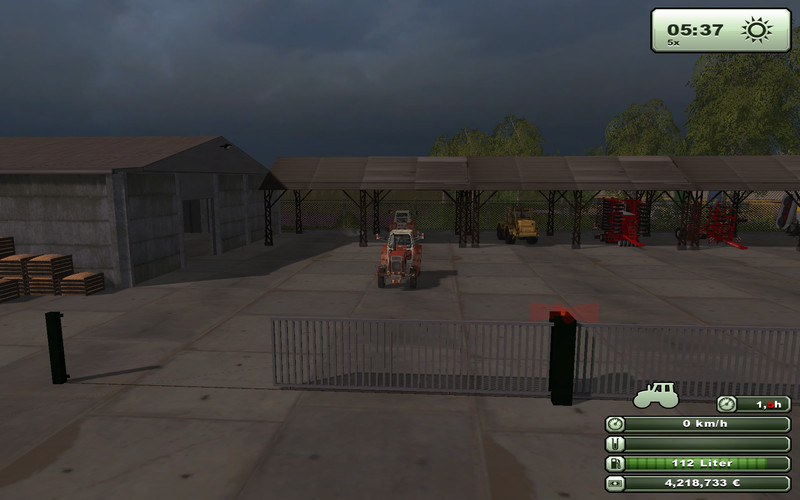
Roller door with warning light
This is a roll-up door with warning light
which flashes when the door is in action.
It is intended for installation on a map with the GE.
Please first read the description, and then install only.
-------------------------------------------------- --------------------------
Hello dear people,
here is the description for this roll-up door with warning light.
This is a normal BGA-up door that opens
is approached by a vehicle or by driving. If you remove yourself from the
Roller shutter door so it closes again.
Furthermore, a warning light flashes on the roller door when it is in action.
The function starts flashing when the roller door opens and turns off when the door
is fully opened. The gate closes again, the warning light is blinking until the
Gate is fully closed again. The flashing function is so long maintained until the gate
has changed from one end position to the other, the other end position is not reached,
flashes the warning light was on until it reaches.
The installation on your map geschiet as follows:
Rolltor_mit_Warnlicht the folder you copied to a suitable folder in your map
e.g. in the map folder / models
The two entries that are in modDescEintrag you copied to the location described
in the modDesc.xml your map.
The two LUA files you copied in scripte in your map directory.
! ! ! IMPORTANT NOTICE! ! !
If anyone of you have built a railway line with CROSSING on its map,
please WARNLICHT.LUA and ENTRY to the modDesc.xml NOT RUN! ! !
The installation is done with the GE.
Open your map with GE and imported the Rolltor_mit_Warnlicht.i3d
Now the gate is displayed with all functions on the 0-point (center) of your map.
Now you can install in the place where you want the roller door.
But considering the installation moving her the entire roller door and any items, otherwise the
Functions no longer work.
So and now want a match with the new roller door wants you
Ieg53i === ===
The roller door who can should be further developed and re-set, but please with the Verweiss
ieg53i is the original modders.
Comments46
You must be logged in to comment.
Ich habe nähmlich keinen Scripte Ordner!
Hallo alle ich hab das Rolltor in die Map eingebaut aber es ist dann kommplett weiß!Und ich weiß nicht wo ich die beiden LUA Dateien hintuen soll!!!
Super eingebaut funktioniert Vielen Dank
Kannst du so ein placeble machen?
Nein, man kann keine Objekte mit Funktion platzieren, weil Giants dafür erst das Script freigeben müsste.
Tor ist verbaut und funktioniert einwandfrei . Der Einbau war Dank der guten Beschreibung easy ! Vielen Dank an ieg53i für die saubere Arbeit ! Gruß Alter_Schwede
wo genau kommen die lua-datein hin?
hallo alle, heruntergeladen Mod installiert und es funktioniert gut Dank 5 von 5
Wo ist die moddesc zufinden ??? ich habe das Tor mit dem giantseditor auf der standert map verbaut. Doch es öffnet sich nicht. bitte um schnelle hilfe
In der Standart map auf gar keinen Fall was verändern oder einbauen! Immer die SampleModMap für Umbauten verwenden! Außerdem gibt es in der Orginalmap keine modDesc.xml.
Hallo, bei mir exestieren in der modDesc.xml die beiden Wörter nicht: <extraSourceFiles> und </extraSourceFiles> jetzt weis ich nicht wo ich die beiden anderen Wörter einfügen soll: <sourceFile filename="scripte/Rolltor.lua" /> <sourceFile filename="scripte/Warnlicht.lua" /> Vielen dank im Vorraus
Sollte dann so aussehen: </description> <iconFilename>map_preview.dds</iconFilename> <multiplayer supported="true"/> <extraSourceFiles> <sourceFile filename="scripte/Rolltor.lua" /> <sourceFile filename="scripte/Warnlicht.lua" /> </extraSourceFiles>
Ok, dann suche mal in der modDesk.xml diese Zeilen: </description> <iconFilename>map_preview.dds</iconFilename> <multiplayer supported="true"/> HIER DARUNTER SCHREIBST DU <extraSourceFiles> HIER SCHREIBST DU DIE BEIDEN EINTRÄGE UND DARUNTER </extraSourceFiles> Alles klar?
Dieses Problem habe ich auch