1 / 2
Virus checked
v1.0 latest
Free Mod
GE10 Script - Spline Toolkit
–
Rating
0 Ratings
471
Downloads
0
Thanks
Enhance Your GIANTS Editor Experience with the Spline Toolkit
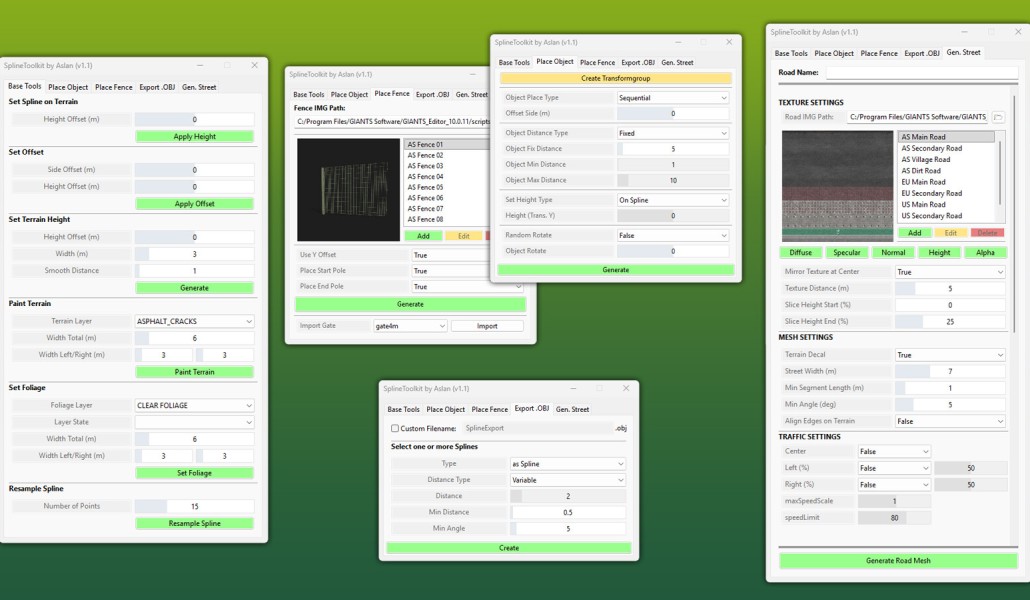
Unleash the full potential of your GIANTS Editor with the Spline Toolkit. This powerful script provides a comprehensive suite of tools for working with splines, making tasks like terrain editing, object placement, and road mesh generation more efficient and intuitive.
Feature Overview:
-
Base Tools:
- Set Spline on Terrain: Project spline points directly onto the terrain with optional height adjustments.
- Set Offset: Apply vertical and horizontal offsets to move a spline.
- Set Terrain Height: Align terrain height with spline height for precise control.
- Paint Terrain: Easily paint terrain along a spline using a selection of terrain layers.
- Set Foliage: Place foliage along the spline path.
- Resample Spline: Adjust the number of control points on a spline.
- Place Objects: Precisely place objects along a spline with adjustable parameters.
- Place Fence: Efficiently create complete fence systems with a structured list of base game fences and preview images.
- Export as .OBJ: Seamlessly export splines as .OBJ files to enhance workflow between GIANTS Editor and Blender.
- Generate Street: Quickly generate roads using base game textures, perfect for previews or as a foundation for more complex designs.
Installation:
- Navigate to the GIANTS Editor installation directory (default: "C:\Program Files\GIANTS Software\GIANTS_Editor_10.X.X\").
- Copy "SplineToolkit.lua" and the "fenceImages" folder into the Script folder of the GIANTS Editor.
- Access the script via the menu bar under “Scripts”.
Updates:
- Update 1.1: UI improvements and new functions "Set Foliage" and "Resample Spline" added.
- Hotfix 1.0.1: Corrected placement of fences at terrain height and fixed side offset for object placement.
Comments
You must be logged in to comment.
No comments yet.